I have been using Playnite to manage my game library. Among its Desktop themes, Dune fits my taste especially well: spacious composition, rounded cards, clean visual hierarchy, and an unmistakable WinUI 3 / Fluent Design influence. Unfortunately, it is a relatively new theme, and its extension compatibility falls well short of more mature alternatives. Some extension pages rendered black text on black surfaces, while other extensions had nowhere to appear at all.
Over the course of a day, Codex and I gradually turned it into Dune Rev: a personal fork maintained by me that preserves the original visual language while adding extension integration and much more control over the layout.
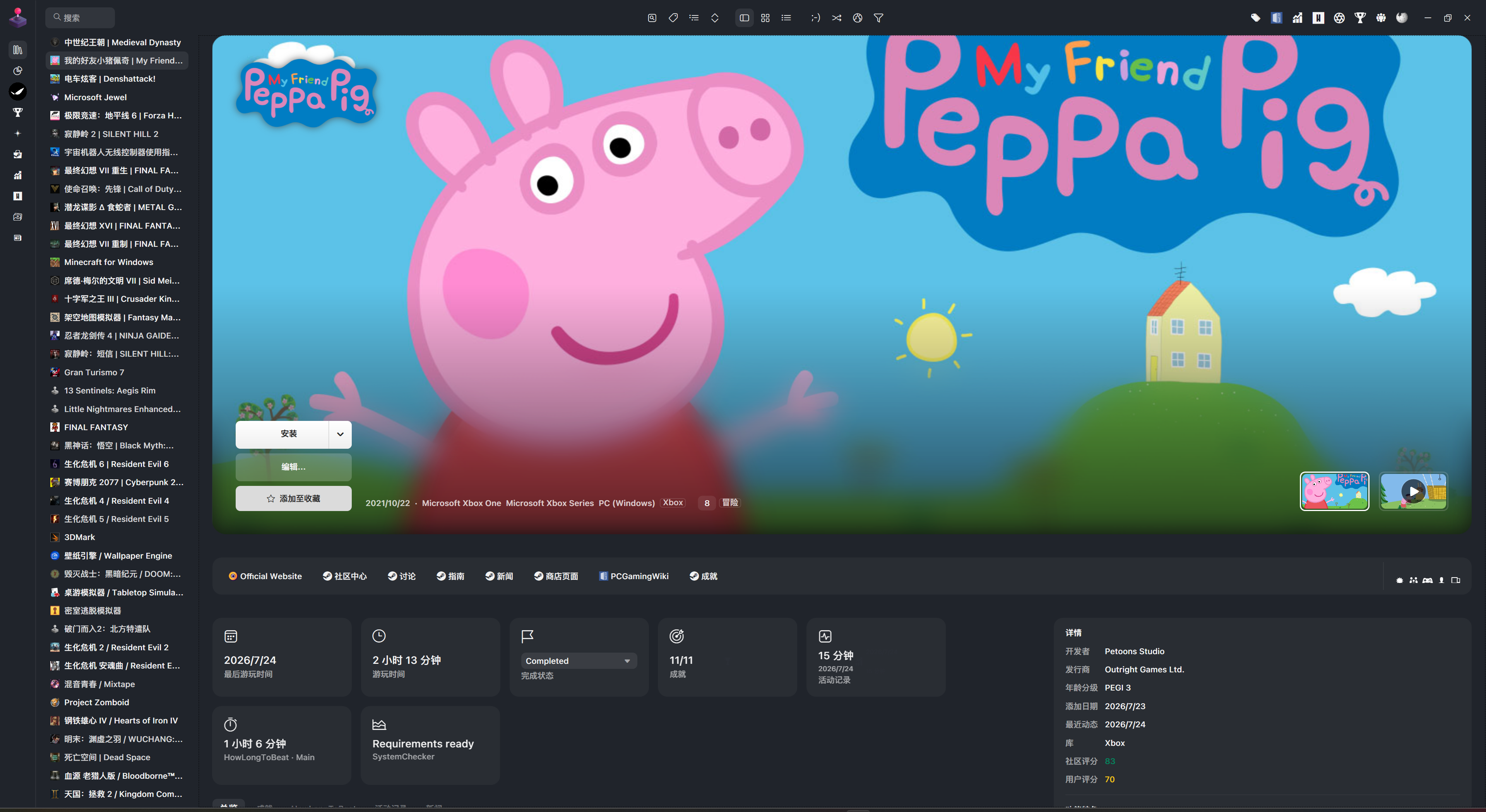
The Starting Point: A Beautiful Theme with an Incomplete Ecosystem
Dune originally advertised support for SuccessStory, HowLongToBeat, Extra Metadata Loader, and ScreenshotsVisualizer. That was a solid foundation, but my everyday setup uses far more extensions. As a reference, Mythic already offered mature integration for BackgroundChanger, DuplicateHider, GameActivity, Library Management, ThemeExtras, Steam news and reviews, ThemeModifier, and more.
The first visible problem was simply “the colors in extension settings are wrong.” Once I started inspecting
the XAML, however, it became clear that adding a few brushes would not be enough. A Playnite theme does not
only define appearance; it also hosts plugin controls and supplies resource dictionaries, visibility rules,
and layout contracts. A missing resource key can make text unreadable. An incorrectly named
ContentControl can prevent an extension from injecting anything. Two views sharing one playback state can
even produce a bug that appears only after switching back and forth between them.
Making Extension Data Part of the Theme
I did not want to solve the problem by stacking every plugin panel at the bottom of the page. Extension data should look like a native part of Dune, so I reorganized the Details View summary area. Last played, total play time, completion status, achievements, activity, HowLongToBeat, and SystemChecker now share the same card language.
The cards follow a few rules:
- A card disappears when its extension is unavailable or the selected game has no corresponding data.
- The remaining cards wrap automatically instead of leaving empty holes.
- Cards that open an extension view have a hover animation to communicate that they are interactive.
- The HowLongToBeat card shows only Main Story, avoiding a cramped row of Main, Main+, and 100% values.
- Full charts, progress bars, and lists remain available in dedicated tabs below the summary.
Playnite Achievements turned out to be a special case. It already includes its own theme migration system, so adding another explicit “native” host actually duplicated or conflicted with the migrated controls. The final solution lets the extension continue handling migration while the theme supplies the colors and control resources it expects. It was a useful reminder that extension support does not always mean writing more code; first, you need to understand what the extension already does.
Dune Rev currently covers these major integrations:
| Feature | Extension |
|---|---|
| Achievements | SuccessStory and Playnite Achievements automatic migration |
| Alternative backgrounds | BackgroundChanger |
| Duplicate copies | DuplicateHider |
| Feature icons | Library Management |
| Favorites and completion status | ThemeExtras |
| Activity history | GameActivity |
| Completion estimates | HowLongToBeat |
| Logos and videos | Extra Metadata Loader |
| Screenshots | ScreenshotsVisualizer |
| Steam news and online players | Steam News and Players Viewer |
| Steam reviews | Review Viewer |
| System requirements | SystemChecker |
| Theme customization | ThemeModifier |
The Hard Part Was State, Not Visibility
Extra Metadata Loader’s logo and video integration produced some representative problems. An early build showed a game icon instead of its logo in Details View. After fixing the control host, video playback exposed a more subtle state bug: switch from Details View to Grid-Details View and back, and the hero area could no longer resume the video, even though playback in Grid View continued to work.
Both views were using the cached standard player, the same RadioButton group name, and the extension’s global
IsVideoPlaying state. The view changed, but the player host and state were not truly isolated. I ultimately
gave each view an independently configured player instance and its own media-selection group, then bound its
play button to that player’s state. This is a neat little WPF/XAML lesson: a control leaving the screen does not
mean its state has disappeared, especially when an extension caches objects beyond the local name scope.
Details View and Grid-Details View Are Not the Same Layout
Width was the other recurring problem. Details View is naturally a widescreen composition: summary cards and extension tabs on the left, with developers, publishers, ratings, and features on the right. Grid-Details View is usually a narrow sidebar beside the cover grid. Treating both as one horizontal layout either lets the information column consume all available space or crushes every card into a narrow strip.
The two views therefore ended up with independent dimensions and composition rules:
- Details View defaults to a 1760 px maximum content width and a 480 px information column.
- Grid View defaults to a 640 px details pane.
- Summary cards wrap in Grid View, with the information panel placed below them.
- Logo, card, extension-panel, button, and top-bar sizes can all be adjusted independently.
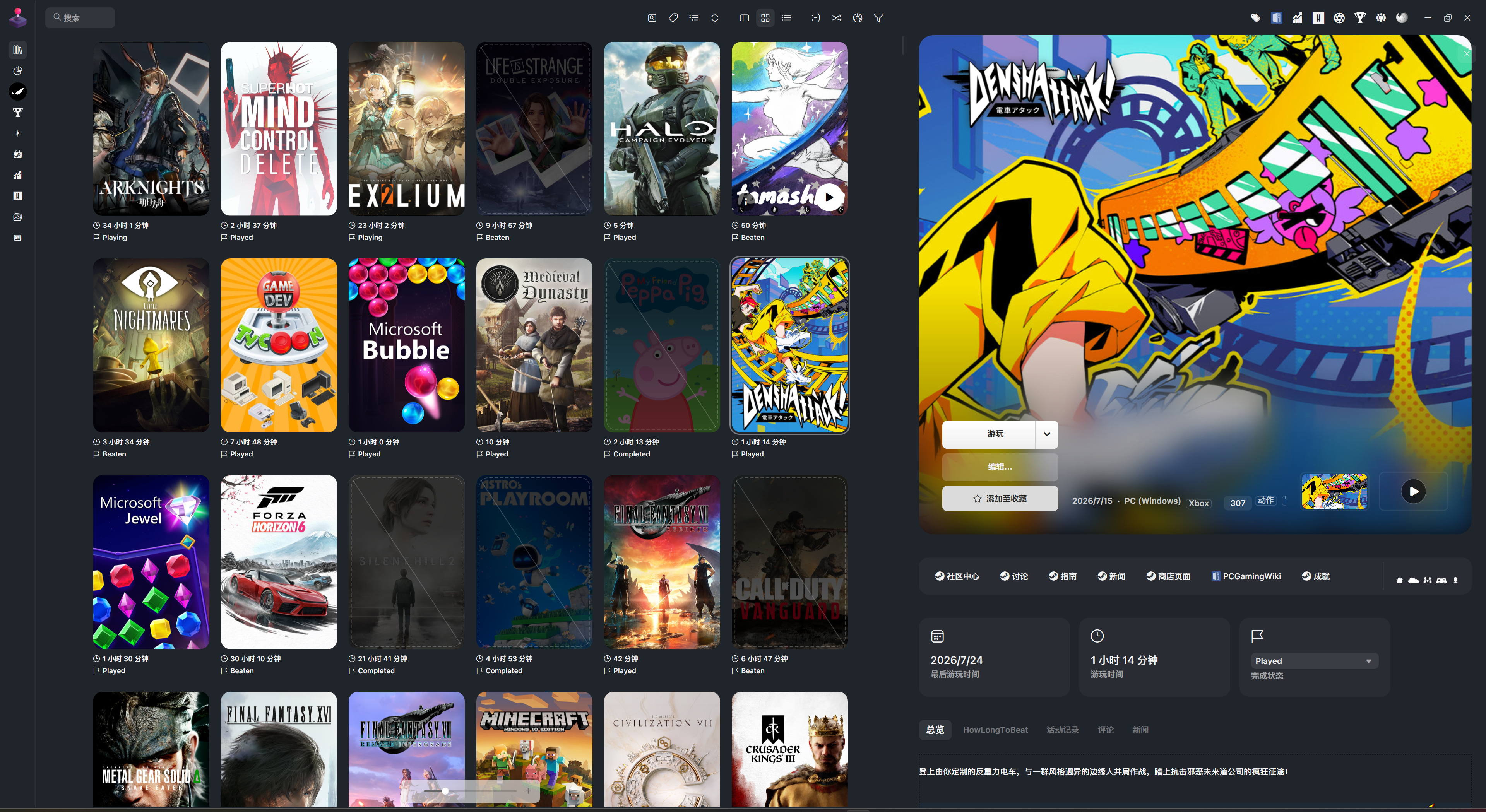
These settings are exposed through ThemeModifier. Its theme-option format currently offers only one
Description string rather than localized names, so I used consistent English / 简体中文 labels and grouped
them into Global Layout, Details View, Grid View, Extension Panels, and Grid Cover sections. The final result
contains 26 audited options that are genuinely consumed by the theme, rather than sliders that appear in the
settings page without affecting anything.
Why Fluent Dim?
Dune already warned that its dark mode could have problems. The deeper issue is that Playnite 10 does not provide extension-injected controls with one reliable, shared light/dark state. The theme’s own controls may switch correctly while a migrated or injected extension page does not. The result is often light text on a light background or black text on a dark one.
Instead of maintaining two palettes that would always be partially broken, I settled on a single Fluent Dim palette. It is more comfortable at night than a conventional light theme without becoming a high-contrast pure-black theme. Dark blue-gray surfaces, softer white text, and translucent Fluent layers keep the appearance subdued. Giving up the mode switch buys much more consistent rendering across the main window, settings dialogs, and extension content.
Turning a Local Modification into a Publishable Fork
As the changes grew, it no longer made sense to treat the project as a local patch. I named it Dune Rev,
generated a new GUID, updated its theme identity, author, and repository links, and prepared a README,
CHANGELOG, .gitignore, licenses, and Playnite Add-on and Installer manifests.
The original project uses the MIT License, which permits forking and redistribution as long as the original copyright and license notice remain. Dune Rev retains sakasakiking’s copyright notice and adds my copyright for the modifications.
The release candidate also went through several layers of validation:
- XML parsing for every XAML file.
- Resource-dictionary loading in the real order using Playnite’s 32-bit assemblies.
- A Release build with no compilation errors.
.pthmpackaging with Playnite Toolbox followed by a package-content check.- Cross-checking ThemeModifier options, manifests, screenshots, and download URLs.
The 1.0.0 package is now ready. The remaining release steps are to create a GitHub Release and submit the Add-on manifest to the official PlayniteAddonDatabase, which is how a theme enters Playnite’s built-in add-on browser.
Conclusion
This work began as an attempt to fix the colors on a few extension pages and ended as a complete review of the theme’s layouts, plugin data, state management, and release process. It also demonstrates an interesting part of Playnite theme development: XAML is not merely a skin. It is a user-interface protocol between the core application and a collection of independently developed extensions.
Dune Rev still looks like the Dune theme I liked in the first place, but it now feels much more like a complete theme I can use long-term. More importantly, it has evolved from a collection of modifications on my computer into an open-source project with its own identity—one that can be validated, updated, and published for others to use.
This post was co-written by GPT-5.6 Sol High and me.